- The Software
- Support
- The System

Utter
Command Task Tours:
36 practical tours that take you through common tasks
Anatomy of a Task Tour
Common tasks, Number of steps, Sample pages and Videos
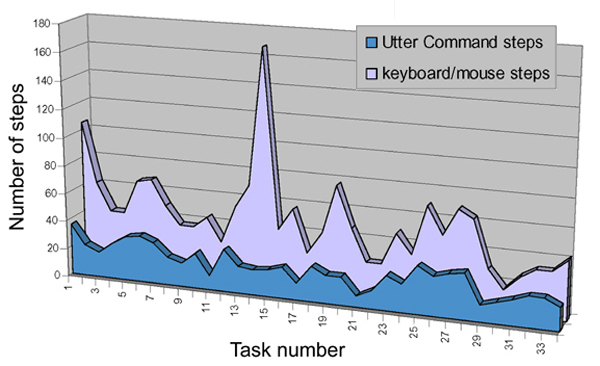
Step comparison graph
Anatomy of a Task Tour
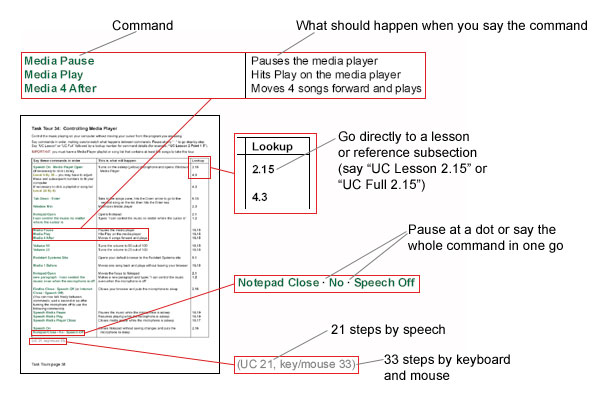
Common tasks, number of steps
and sample pages
| Number of steps | |||||
|
Utter Command Task Tours Contents
|
UC | Key/Mouse | Sample pages | ||
|
|
|||||
| UC Menu and help |
|
||||
| 1. | Accessing the UC menu |
36
|
105
|
||
| 2. | Navigating UC on-screen help files |
22
|
62
|
||
| 3. | Making your own on-screen guide |
17
|
42
|
||
| Basic control: Windows menus and dialog boxes, program menus and dialog boxes, and the mouse | |||||
| 4. | Accessing Windows menus - Video |
25
|
42
|
||
| 5. | Accessing Windows dialog boxes |
31
|
66
|
||
| 6. | Accessing menu functions |
33
|
68
|
||
| 7. | Rulers and mouse commands |
28
|
50
|
||
| 8. | Using mouse commands to play Solitaire |
NA
|
NA
|
||
| Word Processing, email and the Internet | |||||
| 9. | Dictating, editing and bolding - Video |
19
|
37
|
||
| 10. | Moving text around |
17
|
37
|
||
| 11. | Dictating a list |
25
|
45
|
||
| 12. | Sending email - Video |
10
|
28
|
||
| 13a. | The Internet -- with Firefox as your default browser: recommended - Video |
30
|
55
|
||
| 13b. | The Internet -- with Internet Explorer as your default browser |
37
|
59
|
||
| Beyond the keyboard and mouse | |||||
| 14. | Using the UC List dialog box for instant folder, file and reminder access |
19
|
71
|
||
| 15. | Making words and windows dance - Video |
18
|
168
|
||
| 16. | Controlling a window from another window |
19
|
42
|
||
| 17. | Using Keywords to quickly move around a document |
22
|
57
|
||
| 18. | Using Keywords to quickly move around a spreadsheet |
12
|
27
|
||
| 19. | Using Keywords to quickly move around slides |
21
|
38
|
||
| 20. | Cutting and pasting with UC Clipboard “1-20 File” temporary Notepad files |
20
|
77
|
||
| 21. | Using the UC Clipboard “1-20 List File” permanent Notepad files |
20
|
48
|
||
| 22. | Using the UC Clipboard “Alpha-Zulu File” permanent WordPad files |
8
|
25
|
||
| 23. | Using the UC Clipboard “Doc 1-20 File” permanent Word files |
13
|
25
|
||
|
Using UC commands to do anything in any program
|
|||||
| 24. | Finding the right commands |
25
|
48
|
||
| 25. | Using keyboard shortcuts, mouse commands and toolbar buttons |
20
|
34
|
||
| 26. | Formatting in Word |
31
|
69
|
||
| 27a. | Formatting in Word using Word’s Styles utility -- dialog box version |
28
|
50
|
||
| 27b. | Formatting in Word using Word’s Styles utility -- task pane version |
34
|
59
|
||
| 28. | Making an Excel chart and graph |
31
|
69
|
||
| 29. | Making a PowerPoint presentation - Video |
30
|
54
|
||
| 30. | Controlling PowerPoint slides |
12
|
30
|
||
| 31. | Adding a contact in Outlook |
15
|
17
|
||
| 32. | Adding an appointment in Outlook, common method |
18
|
27
|
||
| 33. | Adding an appointment in Outlook, direct-to-dialog-box method |
23
|
33
|
||
| 34. | Controlling Media Player |
21
|
33
|
||
| 35. | Controlling menus in any program including Writer |
20
|
47
|
||
| 36. | Filling out forms |
25
|
51
|
||
Total -- steps in all 36 tasks |
835 |
1,896 |
|||


Also see videos page
Step comparison graph
Across the 36 Task Tours (see above), Utter Command averages 1 command to every 2.3 keyboard/mouse commands -- 835 UC steps to 1,896 keyboard/mouse steps.