- The Software
- Support
- The System

Redstart Systems,
Inc.
[PDF
version]
(617) 325-3966
Utter Command Backgrounder
Contents
Utter Command
The speech interface
How UC improves the speech interface
Air travel metaphor
Utter Command's structured
command language
The system
Pseudo-natural language
Drawbacks of current speech
interfaces
Problems UC solves
Some of UC's capabilities
Step comparison including
methodology
A brief tour of UC
Relevant Studies
Utter Command
Utter Command (UC) is speech interface software from Redstart Systems
that makes computer control twice as fast as the keyboard and mouse. It
includes a consistent, intuitive command system and powerful speech applets.
It supports all software applications and allows you to control every aspect
of your computer using speech.
Utter Command works with Nuance Corp.'s Dragon NaturallySpeaking
Professional speech engine (versions 5 through 10) on Windows 2000, XP and
Vista.
Commands are easy to remember because they follow the language
style people intuitively use in command-and-control situations --
concise patterns that follow the order of events. This makes commands easy
to picture and recall. It's also natural to combine these concise, consistent
commands into command phrases, which drastically reduces the number of steps
needed to control the computer.
Examples:
"Three Lines Copy to Word"
"Window Close No"
(see section 9 for more command examples)
Applets include UC List, UC Rulers and UC Clipboard. These
allow for speech control that goes beyond the keyboard and mouse, including
one-step file, folder and Web site access, fast commandline control, support
for any Web application, and advanced clipboard capabilities (details at
www.redstartsystems.com/elementsofuttercommand.html).
Manual and learning tools are available in on screen and
paper forms. They include a series of practical self-guided tours, step-by-step
lessons, a full command reference, visual aids, cheat sheets, and an alphabetical
index of commands. The comprehensive, two-volume manual is cross-referenced,
and each section and subsection of the on-screen version of the manual can
be accessed using a single speech command (download samples).
The speech interface
Today's speech recognition software is the result of more than 50
years of research and more than two decades of commercial development. There
are two major components of speech recognition software:
- the speech recognition engine: the software that recognizes sounds
as words
- the speech interface: the commands you use to control your computer
Recognition engine technology has improved dramatically and today
does a great job of converting utterances into typed words.
In contrast, the speech interface has received relatively little
attention and so has been a disappointment.
The potential of the speech interface to improve computing has long
been recognized. The problem has been figuring out how to break the speech
interface free from the constraints of the keyboard and mouse and at the
same time make it easy and comfortable to use.
Utter Command taps the words people intuitively use in command-and-control
situations. Think of flying a jet, dispatching emergency vehicles, coordinating
with coworkers in a fast food restaurant, calling plays in a game. You naturally
use a more structured language that lets you issue commands quickly without
room for error and without having to think about what to say.
Utter Command brings this command-type language to controlling a
computer -- things like accessing folders, files, websites, moving windows,
controlling programs and filling out forms. Utter Command makes controlling
a computer by speech easier than today's speech recognition software and
faster than the keyboard and mouse.
How UC improves the speech interface
Utter Command functions fall into four basic types:
1. Those that fill in pieces of the speech interface that are
missing or incomplete.
These allow you to do something you're currently only able to do
with the keyboard or mouse. Utter Command's window moving and sizing commands
fall into this category.
2. Those that improve the existing speech interface.
Utter Command's mouse commands fall into this category as an improvement
over NaturallySpeaking's MouseGrid.
3. Those that improve the computer interface in general.
These allow you to carry out actions in fewer steps, and thus faster
than is possible with the keyboard and mouse.
Deep menu commands, combined keystroke commands, combined text and
keystroke commands, and combined mouse and text commands all fall into this
category. Add the ability to call up a dialog box and change settings in
one utterance and you can really speed things up.
4. Those that go beyond the keyboard and mouse.
UC commands that fall into this category include single speech commands
that directly call up any file, folder or Web site and the UC Clipboard
commands that greatly increase classic clipboard functionality.
Air travel metaphor
Think about the differences between road travel and air travel.
A plane goes faster than a car, so following a road by air is faster than
driving, and following roads might not be a bad idea at first to get your
bearings.
But the real power of air travel is the ability to travel any route,
including areas inaccessible by car like large bodies of water, mountain
ranges and polar regions.
The speech command system that underpins Utter Command maps these
direct routes for communicating with a computer by speech. This unleashes
the true potential of speech commands. You can get to any file, folder or
website using a single command. You can jump to any word or phrase, including
numbers in any document using a single command. You can start an email,
including Cc'ing and a greeting, in a single command. You can press a string
of four keys using a single command. You can press a string of four keys,
then repeat that string 1-10 times using a single command.
There's a longer list here.
Utter Command's structured command language
Utter Command is underpinned by a consistent speech command system
that follows the way we naturally use command-type language.
Real-life examples of the way people actually use command-type language:
- Giving orders in a fast food kitchen: "Two Fry"
- Calling a play on a football field: "Counter Trey Right"
- Dispatching a police vehicle: "Unit 26, Code 11-31, 13th and Vine"
- Controlling air traffic: "Delta 265, clear to land, runway three zero"
UC commands:
"Speech On"
"Line Copy"
"3 Before"
"Window Close"
"Word Open Maximize"
"Excel Close No"
"Screen Clear"
"Line Copy to Word"
"2 Down · 3 Lines Cut"
UC commands follow the way the brain works, are succinct and consistent,
and because commands can be combined, speed productivity.
UC commands have three immediate and major advantages:
1. Commands are easy to learn and remember. This makes commands
become habit relatively quickly, freeing up mental power for the task at
hand rather than computer communication.
An independent study by researchers at Carnegie Mellon University
found that 74% of users prefer a structured grammar rather than the traditional
natural-language approach to speech recognition.
2. Commands use fewer computer resources than a pseudo natural-language
grammar (there's more on pseudo natural-language in section 7 below).
3. Commands are easy to combine, which speeds computer use, often
dramatically.
Words
Utter Command contains 253 command words that are used to build
commands. Ninety-seven of these are keystrokes, leaving 156 new words to
learn to master all of Utter Command. A vocabulary of only 60 command words
is needed for basic competency. These words are by design easy to remember.
Top 60 UC command words: (plus numbers and screen labels in <>)
|
|
|
|
See the full set of UC command words here.
Rules
Commands are consistently constructed according to 16 grammar rules.
Most common UC grammar rules
- Eliminate synonyms
- Follow the way people naturally adjust language to fit a situation
- Follow the order of events
Learn about a third of the words (left, right, up, down, before, after, lines, graphs, 1-100, open, close, bold, delete, undo ...) and a handful of general rules (select, then carry out an action), and you'll find yourself humming along nicely saying things like "5 Down", "3 Lines Bold", "2 Delete", "5 Undo", "Word Open", "Excel Close"...).
The system
The command system that underpins Utter Command is a system of words and rules designed to allow people to communicate commands to computers.
It takes into consideration that while language seems easy for humans, different phrasings encompass a considerable span of cognitive effort. Utter Command is designed to limit cognitive effort in order to free up as much of the brain as possible to concentrate on the task at hand.
Natural language allows for a wide, textured range of communications, but controlling a computer only requires a relatively small set of distinct commands.
Utter Command uses a succinct set of words that can be combined according to a concise set of rules to communicate commands. The system is easy for people to learn, and computers can respond to the commands without having to decode natural language or be loaded down with large sets of synonymous commands.
Utter Command uses 253 words, 97 of these are keystroke names.
The full set of UC command words is posted at www.redstartsystems.com/uccommandwords.html The full set of rules is posted here.
Pseudo-natural language
The main thrust of research and commercial development efforts in speech interfaces is natural language. The ultimate goal of natural language research is to make the computer intelligent enough to understand language and thus interact more like a human who can discern many types of phrasings. Natural language understanding has not been achieved in the lab. Its a hard problem that is not close to being solved.
Influenced by this research, however, a pseudo-natural language approach has emerged in speech interface products. Existing speech recognition interface grammars provide several ways to say any given command.
For example, Nuance's NaturallySpeaking provides 24 different ways to word commands for moving the cursor to the beginning of a line.
|
|
NaturallySpeaking also offers four different ways for the user to say the punctuation mark Open Quote and four more ways for the user to say the punctuation mark Close Quote. It uses many synonyms, including Start, Begin, Give Me, Check, Show, Open, Bring Up, Edit and View as the first word or words in commands that bring up a program or dialog box.
And it offers 16 synonymous wordings for checking mail, 16 for creating a new mail message, five for opening a selected email message, and five for closing an email message. This total of 42 wordings for four functions are specific to one email program.
Drawbacks of current speech interfaces
There are three major drawbacks to the pseudo-natural language approach.
1. The programs don't cover all the ways you might think of to say a given command. When people are left to figure out command wording for themselves, they often use wording that's not accepted by the speech software.
When the computer doesn't respond to a command, there are several possibilities for what went wrong -- the computer might not have interpreted your words correctly, or those words might not be correct wording for that particular command. Having several possibilities for what went wrong makes it difficult to know what to do next. If the computer didn't interpret your words correctly, you should repeat the command. If the words are not correct for that particular command, you should try another wording.
Having multiple wording possibilities for commands also makes it difficult to provide full, usable documentation. Users are advised to guess rather than look up commands because the on-line facility to look up a command from the full command list is slow and awkward.
This drawback makes speech recognition software frustrating to use.
2. Having many ways to word commands means the computer must listen for many different possibilities, which slows the computer's response time. Synonymous ways to word commands also means the person must make a choice, which slows human response time.
This drawback makes using a computer by speech slower and more difficult than it needs to be.
3. The pseudo-natural language approach makes it impossible to tap one of the large potential advantages of speech recognition -- combining several computer steps into one command. This is the most important of the drawbacks.
To carry out a task on a typical computer using the keyboard and mouse, you often must carry out many steps to accomplish a single task like finding a particular file. This is because the keyboard and mouse have real estate limitations -- a finite number of keys on the keyboard, and a finite amount of space on the screen used for mouse choices.
In theory, speech doesn't have a real estate problem -- there are many words and word combinations available. The pseudo-natural language approach, however, squanders this potential.
If you have an average of 5 ways to say each of 20 commands and you'd like to be able to combine any 2 of these commands, the computer must listen for 100 x 95, or 9,500 possible combinations.
The numbers go up quickly.
- 3-command combinations of the same 20 commands (100 x 95 x 90) make 855,000 combinations
- 4-command combinations of 20 commands (100 x 95 x 90 x 85) make 72 million combinations
- 4-command combinations of 20 commands with 10 wordings each rather than just 5 (200 x 190 x 180 x 170) make 1.6 billion command possibilities.
In reality, you need more than 20 commands in combinations to control a computer. The exponential nature of synonymous combinations makes the natural language approach incompatible with the need to combine commands.
This drawback is crucial because it takes away the speech interface's potential to greatly speed computer use. After all, if you don't have to make a decision between steps, there's no need for separate steps unless you're forced to accommodate the computer.
See command step comparisons here.
Problems UC solves
Utter Command unlocks the considerable potential of speech control of computers. It solves the key problem of remembering what to say to control a computer. It also enables combined commands, which speeds computer control beyond the keyboard and mouse.
Speech user problem: Don't know what to say; can't remember commands
UC Solution: A structured grammar that follows the way the brain works
Speech user problem: It's tiring to use speech commands
UC Solution: Intuitive commands; fewer commands
Speech user problem: Speech is slower than the keyboard and mouse
UC Solution: Carry out multiple keyboard/mouse steps using a single speech command
Some of UC's capabilities
Utter Command lets you use a single speech command to, for instance,
| | open the UC documentation directly
to any section or subsection e.g. "UC Lesson 1.7" (UC Lesson 1.7) |
| | go directly to a section or
subsection of any document e.g. "Find Section 3" (UC Lesson 10.1) |
| | open any Windows or program
dialog box e.g. "Search Open" (UC Lesson 2.7, 3.3) |
| | move and size a window or dialog
box e.g. "Size 50 By 90" (UC Lesson 2.12) |
| | move down a page in one document
while your cursor remains in another document e.g. "Word Screen Down Return" (UC Lesson 2.14) |
| | open a menu (including right-click
menus) and click a menu item buried many levels deep e.g. "Under i p f" (UC Lesson 2.19, 3.3) |
| | open any dialog box for a few
seconds to check a setting then close it e.g."Under t w Close" (UC Lesson 3.4) |
| | move and click the mouse arrow e.g. "50 By 50" (UC Lesson 4.2) |
| | go directly to any file or
folder e.g. "Excel Budget Folder" (UC Lesson 5.6, 5.7) |
| | hit any key many times in a
row!!!!!!!!!!!!!!!!!!!! e.g. "Exclamation Times 20" (UC Lesson 6.7) |
| | hit any key combination e.g. "Shift Control b" (UC Lesson 6.9) |
| | hit several keys or key combinations
in a row e.g. "Home Hyphen Space" (UC Lesson 6.13) |
| | format many elements at once
by hitting as many as four keys in a row, then repeating the cycle
as many as 10 times e.g. "Down Home Hyphen Space Repeat 7" (UC Lesson 6.14) |
| | select and delete, cut, copy
or format words, lines or paragraphs in any program e.g. "3 Befores Delete" (UC Lesson 7) |
| | open and address an email message
to as many as three recipients e.g. "Outlook Bill CC Sue" (UC Lesson 8.4) |
| | go directly to any Web site e.g. "Redstart Systems Site" (UC Lesson 9.2) |
| | find any keyword in any program e.g. "Find Section 3" (UC Lesson 10.1) |
| | copy a selection to any program e.g. "Line Copy To Word" (UC Lesson 10.2) |
| | number existing lines e.g. "1 Through 20 Home Enter" (UC Lesson 10.8) |
| | set break reminders to go off
every half-hour e.g. "2 Minutes Break Wait 30 Minutes Repeat 1-10" (UC Lesson 10.12) |
| | set a reminder to call John
in 45 minutes e.g. "45 Minutes Call John" (UC Lesson 10.13) |
| | change media player tracks
while working in another program e.g. "Media 2 After" (UC Lesson 10.15) |
| | fill out two fields of a form
at once e.g. "1 Tab Address · 2 Tab Boston" (UC Lesson 10.22) |
| | fully enable the commandline
interface e.g. "Directory Enter" (UC Lesson 10.23) |
| | name a mouse click, or two
clicks in a row e.g. "Color Touch", "Color Blue Touch" (UC Lesson 10.24) |
| | select and search for selected
text on a specific Web site e.g. "Word Gold Bamboo Search" (UC Lesson 9.7) |
(If you have UC loaded, say the name and subsection of the lesson shown in parentheses e.g. "UC Lesson 1.7" to call up the electronic version of that lesson open to that subsection.)
Step comparison including methodology
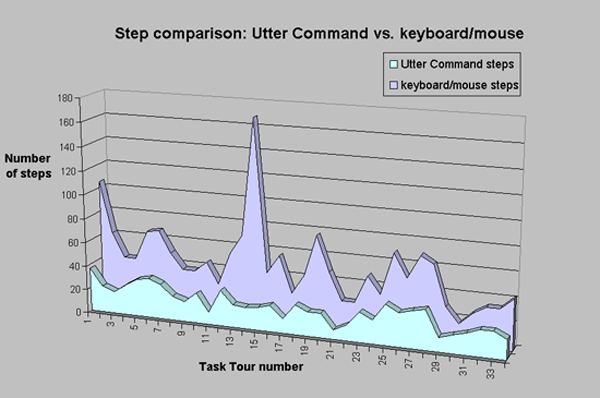
Keyboard/mouse step count methodology
1. We use the most efficient keyboard/mouse command sequence possible to carry out the given task, disregarding any awkwardness involved in switching between keyboard and mouse.
2. We assume any given program is accessible via one mouse click at any given time.
3. We assume that Web addresses are in the first layer of a favorites list.
4. We assume that files have not been recently accessed.
5. We count any amount of pure text as one step.
6. When a string of characters occurs as part of a speech command, we count the characters, regardless of how many there are, as a single command for the keyboard and mouse. For instance, "Tab 7.8", counts as two mouse and keyboard commands: "Tab Key" and the text string "7.8".
7. If there are more than five keystrokes of the same key in a row it is assumed the typist will use the hold and release method; this is counted as two keystrokes.
8. Because you don't have to turn the microphone or rulers on or off when using the keyboard and mouse, we don't count those steps in the keyboard/mouse totals.
9. Optional "if necessary" commands are ignored.
|
Task Tours
|
UC | Key/Mouse | ||
| steps | steps | |||
|
|
||||
| 1. | Accessing the UC menu |
36
|
105
|
|
| 2. | Navigating UC on-screen help files |
22
|
62
|
|
| 3. | Making your own on-screen guide |
17
|
42
|
|
| 4. | Accessing Windows menus |
25
|
42
|
|
| 5. | Accessing Windows dialog boxes |
31
|
66
|
|
| 6. | Accessing menu functions |
33
|
68
|
|
| 7. | Rulers and mouse commands |
28
|
50
|
|
| 8. | Using mouse commands to play Solitaire |
NA
|
NA
|
|
| 9. | Dictating, editing and bolding |
19
|
37
|
|
| 10. | Moving text around |
17
|
37
|
|
| 11. | Dictating a list |
25
|
45
|
|
| 12. | Sending email |
10
|
28
|
|
| 13a. | The Internet (with Firefox as your default browser: recommended) |
30
|
55
|
|
| 13b. | The Internet (with Internet Explorer as your default browser) |
37
|
59
|
|
| 14. | Using the UC List dialog box for instant folder, file and reminder access |
19
|
71
|
|
| 15. | Making words and windows dance |
18
|
168
|
|
| 16. | Controlling a window from another window |
19
|
42
|
|
| 17. | Using Keywords to quickly move around a document |
22
|
57
|
|
| 18. | Using Keywords to quickly move around a spreadsheet |
12
|
27
|
|
| 19. | Using Keywords to quickly move around slides |
21
|
38
|
|
| 20. | Cutting and pasting with UC Clipboard “1-20 File” temporary Notepad files |
20
|
77
|
|
| 21. | Using the UC Clipboard “1-20 List File” permanent Notepad files |
20
|
48
|
|
| 22. | Using the UC Clipboard “Alpha-Zulu File” permanent WordPad files |
8
|
25
|
|
| 23. | Using the UC Clipboard “Doc 1-20 File” permanent Word files |
13
|
25
|
|
| 24. | Finding the right commands |
25
|
48
|
|
| 25. | Using keyboard shortcuts, mouse commands and toolbar buttons |
20
|
34
|
|
| 26. | Formatting in Word |
31
|
69
|
|
| 27a. | Formatting in Word using Word’s Styles utility -- dialog box version |
28
|
50
|
|
| 27b. | Formatting in Word using Word’s Styles utility -- task pane version |
34
|
59
|
|
| 28. | Making an Excel chart and graph |
31
|
69
|
|
| 29. | Making a PowerPoint presentation |
30
|
54
|
|
| 30. | Controlling PowerPoint slides |
12
|
30
|
|
| 31. | Adding a contact in Outlook |
15
|
17
|
|
| 32. | Adding an appointment in Outlook, common method |
18
|
27
|
|
| 33. | Adding an appointment in Outlook, direct-to-dialog-box method |
23
|
33
|
|
| 34. | Controlling Media Player |
21
|
33
|
|
| 35. | Controlling menus in any program including Writer |
20
|
47
|
|
| 36. | Filling out forms |
25
|
51
|
|
|
|
||||
| Total -- steps in all 36 tasks |
835
|
1,896
|
||
| Step comparison 1,896/835 = 1/2.3 |
1
|
2.3
|
||
(See task tour videos)
A brief tour of UC
The quickest way to get a sense of Utter Command is to go to the videos page, and choose a video to see. Then take a look at the graph on the bottom of the video page. Then click on "UC Overview" at the bottom of that page to get an overview of the parts of Utter Command. Make sure to check out the "Rulers", "UC List", and "UC Clipboard" facilities.
For detailed explanations of Utter Command in the underlying human-machine grammar see papers and presentations.
Relevant studies
Study: Repetitive Strain Injury
"Repetitive strain injury cases have soared by more than 30% in the last year [in the UK], costing businesses more than £300 million in lost working hours. This worrying rise is directly related to the rapidly emerging trend of mobile working using laptops and mobile devices."
- Medical News Today, June 4, 2008, quoting a Microsoft research study
Study: Using the keyboard and mouse on mobile devices
"Research funded by the Engineering and Physical Sciences Research Council (EPSRC) indicates that many able-bodied people make the same errors and with similar frequencies when typing and 'mousing' on mobile phones, as physically impaired users of desktop computers."
- University of Manchester news release, July 1, 2008
`